Tag Archives: automated trading

Building a Better Trading Bot: Lessons from FastTrade to VOLT

The bot that’s running on the VPS, which is testing my ability to stomach losses, I’ve called FastTrade (now at version 1.3). This is the bare-bones design, and “works” perfectly. I was happy with where I’d got it to but didn’t want to be slowed by years old coding decisions. It’s mad how you can have code that works well, but then when you spend a bit of time actually thinking about it, you come up with another solution. Then you think some more, and change it again.

One example of this was my logging code. In OSCAR (a retired bot) I’d written code for each logging event – this wrote a line to my logging sheet individually as they were called, including an xlUp line (obviously this brings into question how serious I am about efficiency). It did work, though writing to the sheet on each log event is not in line with my quest for speed. So, one goal I had was to store log events to an array and paste the array at market change, where trading isn’t happening so speed is less important. I moved all the logging code to it’s own module, added an array, and put the repeated code in it’s own sub. Each logging event, still having its own sub, added a string element such as “Trading Period Started” and called the sub that added all the other detail at that exact moment. I then refined this further by adding a string argument to the sub for the name of the logging event. My logging code has gone from multiple subs to just 2 – the log-event-with-argument sub, and the log-log-to-log-sheet sub. Splendid.

I’ve been building my new bot from the ground up, including the log stuff. I’m calling this one VOLT (VOLume Trader). I’d tested manually and got to a point where live testing was possible. An important element here – always have a boolean argument that allows trading. Set to false and the entire code can run but the bit that writes the trigger/order is bypassed. Once you’re happy to trade, change it to true. Although this isn’t an emergency stop, it does allow for testing and quick interventions if things aren’t quite right but you want monitoring to continue.

Well I’d tested and tested, debugged and tested, debugged etc. Literally as soon as I went live it failed – subscript out of range. I actually like this fault finding part, it’s solving the puzzle that I enjoy. Fortunately for me it was one puzzle after another. Not checking for previous data entries, so writing the same thing over and over, exceeding the array size. Then not incrementing after adding data, so missing loads of log events. Checking for the wrong cased words (Closing vs CLOSING). The list is long but my time is short (a bit dramatic).

I’ve written this post whilst watching VOLT run through Sunday evening US horse markets on another screen and all is now well. Logging is working, as is market navigation, where I appear to have got rid of the double quick-pick-list refresh that caused no problem but I found mildly irritating.. The trigger code is there but not active yet. Next step is to add some temporary what-if logging, see how it fares. Happy trading, botters.
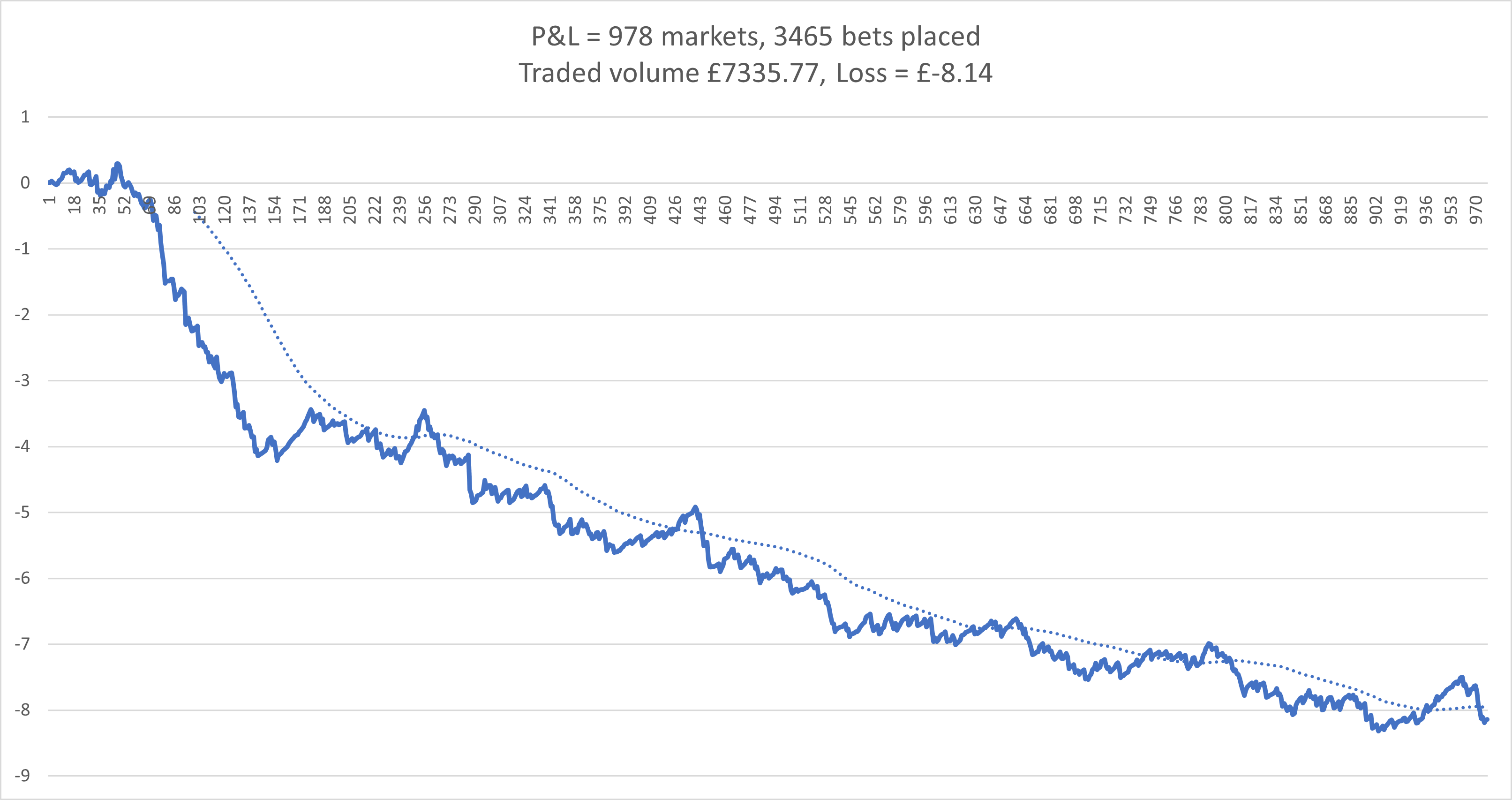
A little P&L, mostly L

The bot has run flawlessly so far, as in it hasn’t failed to navigate the markets or missed any tick offset or stop loss. I do have a chasing stop loss set, and that’s been activated a few times but worked as it should.

The trade/order I’m placing with this set up when triggered is – Take Back offer, fill or kill 3s, 1 tick offset, 2 tick stop loss, 0.5s chasing stop loss, all set for levelling. I’ve made a few adjustments to the trigger to find the limit of effects of different parameters.

In cleaning the code I have got rid of an annoying problem where I’d get an error every time I linked the sheet to Gruss. I’d select any blank cell on the sheet, press Del, and then F5 the code and away it would go, no further problem. It was the reference to the spreadsheet that was incorrect, I’d not included the file extension .xlsm, which makes me wonder how it ever worked. But it did and now it does better.

Here’s a chart. This is for most of March and April up to today. Stakes are around £2. The early sharper drop was done with quite open settings. After reigning it in the losses slowed and remained relatively consistent.

My new bot is coming on with improved logging and some better tracking going on. I’m hoping to have it on the VPS in May for testing. The volume tracking is working but I think I can improve it, specifically the amount of data it holds, which I think can be reduced, but doing that efficiently without slowing the whole thing is my goal.

Setting up a VPS in 2025

Setting up my VPS recently was similar to my previous experience, but there’s a few options out there so I thought I’d tell you about what I did and the spec I’ve gone for.

My previous set ups – Tagadab 2016 which I updated to cloud, and followed up with Another VPS update

When I opened my new VPS for 2025 I went for the basic VPS1 Windows package from Hostworld – 1x vCPU 1gd ram. I was immediately underwhelmed. Everything was slow. Response of mouse and clicks was delayed, opening apps took a while. I was surprised as previously I found the performance of this spec level ok. The difference may be due to the Hostworld server set up, the Windows Server version, or something else. Maybe at this point I should have tried another provider.

Anyway, I upgraded to the 4x virtual core 4gb ram VPS3 option, which works a treat and should be good for multiple bots. It feels as fast as my laptop OS. The price of this is similar to Simply Cloud’s 2x vCPU 4gb option which  may have been suitable, but I haven’t tried it so I don’t know.

After sign up, you get a link to connect to the VPS and it creates a desktop shortcut. Once the connection is made the VPS appears like a standard desktop, which you navigate in the usual way. If you have the new Windows App on your phone (it used to be called Remote Desktop) and open the email link sent to you at sign up, you can connect directly to the VPS. The window that opens is a standard desktop. Swiping moves the cursor, tapping to left click.

Back on the laptop and logged into the VPS, downloading Gruss was simple – open browser, go to Gruss Betting Assistant download, and download. Then open and sign in. For info – you can be signed in on the VPS and your home computer at the same time.

A note here regarding the Windows Server option. I initially chose 2019, but Gruss wouldn’t open due to requiring a specific .NET version. I think it was v4.1 or higher. Although all my Google searches said upgrading Server 2019 was possible, I struggled to do so. I reset my VPS with server 2022 OS and it worked fine. Again, this may be to do with Hostworld’s settings, I don’t know. It works now though.

Getting excel was also easy, although slightly unbelievable. I searched for an Office key, and purchased one for 84p – yes £0.84 – for office 2019! Which is perfectly fine. At that price it doesn’t matter that it’s a one use key. Activating required using the phone method, entering the product key and a very long verification code. Nothing difficult though.

Getting my excel file to the VPS was done by copy/paste from my laptop file explorer to VPS file explorer.

If you haven’t set up a VPS and are thinking about it, I’d say give it a go, it really is doable. And once it’s up and running, there’s very little maintenance needed. I had a couple of updates to do in the first 24 hours and nothing else since. Do remember to change automatic updates to ask before doing, you don’t want the VPS restarting mid trade.

A brief catch-up

After posting in July 2020 I continued the bot for a few more months, then switched it off and closed the VPS due to not spending any time on it. I had plenty of ideas I still wanted to try but other things took priority.

Apparently nothing in 2021, that I can remember.

Throughout 2022 I worked on a strategy based around Australian harness racing. This was mainly due to the availability of race data from harness.org.au, and my ability to collect and work on it. I built my VBA code initially to scrape the previous 18 months of data, and then altered it to run on a daily basis, adding all the new daily data and working backwards to calculate my own ratings, then picking some value bets. It was at this point that the obvious fact I’d missed became apparent – relatively few harness races are available on Betfair. Top tip – always research ideas thoroughly before acting.

Late 2023 and into early 24 I modified a bot to trade on the dogs following prices movements over time. The code was a bit messy and took a while to refine to something that worked. The main problem was once I’d got the code working, I struggled with finding an effective trigger. I thought there was something not quite right and I was planning on moving that to a VPS, but it slipped away for a while.

Then after this last Christmas holiday and into 2025, I picked it up again. Almost immediately spotting an absolute wanger of an error in the code, meaning my price tracking was out of sync with the market. It’s so obvious now as to be almost embarrassing. Simply, each refresh added selected price/volume data to an array and, to keep things trim, deleted entries deemed old. New data was added to the next available slot, but as refreshed are not at set intervals, new data was being dropped in almost randomly. Anyway, I popped that to one side and focused on getting back to basics. With bloated code and masses of notes, I wanted to refine my old favourite bot to be as minimal, or as fast, as possible. The code is now down to the bare minimum, with a clear flow and separated market navigation and trading. So far this approach hasn’t failed. That’s where I got to before starting a VPS and trading from there.

With the bot running ok, although not producing much, it’s the solid base I wanted to get to for my new developments which continue on and off.

VPS Latency

I’ve set up a new VPS with Hostworld and have made a short video showing the difference in latency between my laptop and the VPS. This was a UK greyhound race a minute or two before the start. The number in the green arrow tracing the green line is the latency. the blue line shows the refresh. The VPS is chart is to the rear, with the green marker at the bottom left. It is generally a lower latency, but also more consistent than the laptop.

2017 Results

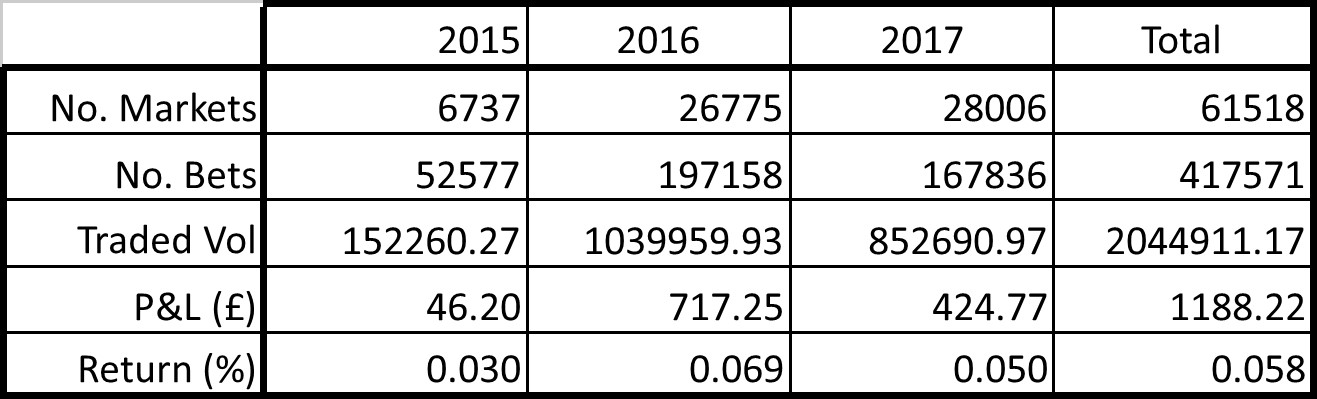
Here are the numbers for 2017 –

Number of markets traded – 28,006

Number of bets settled – 167,836

Traded volume – £852,690.97

Profit and loss – £424.77

Return on traded volume – 0.058%

I haven’t really been bothered with it for a few months and am actually surprised with the final figures (DIY and family have had my time of late). I check in on the VPS now and again and was seeing the past few months not doing very well. The totals for 2017 are propped up by a strong start to the year (see image at bottom).

A little dig in to the numbers we can see that more markets were traded than in 2016 – up 1231 – I did run in other events for  a couple of months or so, which accounts for about the difference. Number of bets settled were down. Traded volume was down overall by around £150,000. Average traded per settled bet dropped from £5.27 to £5.08. Return dropped to 0.050% from 0.069% with a profit for the year of £424.77. (Taking into account the costs of the bot, currently at £21/month, gives a real profit of  £172.77 and a real return on traded volume of 0.020%.)

BIG FIGURE – Traded volume since restart in 2015 is –

£2,044,911.17

That’s a multi-million pound botting operation right there!

I spend more time thinking of coding than actually doing. I sat down to do some tonight but ended up sorting results and doing this post. We’ll have to see what I get up to this year but I would like to advance the current bot.

To my fellow bottors – I hope you all profit from your hard work, happy 2018.


2015_2016_2017_totals

Updated updating and simply greening

First, Liam replied to July ’17

You can set the conflation during the market subscribe request, defaults to 0 but you can choose how often you want to receive it. It’s odd because it’s a handy feature but none of the trading apps seem to use it.

I know betfair use a piece of open source software called Kafka for managing streaming updates but there is probably something else handling slow consumers (conflation). Sockets are complex but at a high level it is my understanding that once the receivers buffer is full the server is told this which then allows the server to halt sending more data. I believe it is then a case of updating that ‘halted’ data to prevent the consumer receiving ‘stale’ data.

Hopefully that makes more sense.


Thanks Liam, it does. I appreciate this is more in-depth stuff and beyond most of us but I am interested in these things. It’s the sort of detail that gets exploited by those in the know before anyone else cottons on. I wonder if the lack of utilisation by trading apps is because setting it for optimal performance would be very specific to an individual socket, the machine’s processor, what else it was doing at the time and the level of market activity?

test_passed_stamp

Now, bench testing complete, I’ve put the new Oscar live on the Aus horses only (staged implementation, sounds good). As mentioned in the last post, there are two areas where significant changes have been made to the code.

I trialled two different methods of navigating the markets. One is quite basic and simple code, the other more complex but I thought it would handle any troublesome delays better. It was over complicated though and as I worked through the errors whilst testing, it became bloated and confusing. Impact wise, the simpler code is only one extra step on an if-then-else statement. And it’s the same amount of steps as the old code. I’ve set it to update after a set time, 1:45am, then select first race in list shortly after. I use the day number, as integer, to check if the process has completed today. Previously the list update was performed within a set time period, which was fine when there were regular updates at the desired refresh rate. But with streaming, if there’s a market loaded that’s a few day’s off, as is sometimes the case for big events, there are no regular refreshes. This can mean that the set time window see’s no updates to run the list refresh code.

That change is almost not needed because of the next change. I’ve coded to turn full streaming off when not within the trading time zone. This forces regular refreshes. The above change will still come into use though if there are any issues causing a delay (can’t think what, but the code is better now, I’m sure).

Finally for this update, I’ve employed the green up trigger to replace my code. The module is less than a quarter of it’s previous size and the trigger takes care of cancelling any unmatched bets, submitting a greening trade and then chasing every second until matched. Splendid.

July ’17

Liam commented on Streaming and NSW

Its important to note that latency from streaming is a function of how quickly you can process the updates. If your CPU is unable to process the updates quick enough betfair will apply conflation which is what you are probably seeing. Of course network latency can impact this but its is more likely to be due to CPU / algorithm you are using to process the stream.

“””
Writes to your connection are directly effected by how quickly you consume data & clear your socket’s buffer
Consuming data slowly is effectively identical to setting conflation.
If you receive conf=true flag on a market – then you are consuming data slower than the rate of deliver
“””

Thanks for the comment.

This is something new to me and trying to find further info doesn’t reveal much. I haven’t seen any reference to it in the Gruss error log. Although I’m not entirely sure I understand this correctly. The statement in the quotes talks of “effectively setting conflation” by consuming data slowly. But who sets conflation? Which I guess to mean that updates are delivered in groups, merged, rather than individually. Is it something you can do from this side? Or is it a decision made by Betfair? But how would they know how you’re processing the data? My understanding of streaming is that it arrives at your computer as is, stored in a local cache(?), then processed by the program/bot. Would it be delivered/streamed to the computer conflated? Or conflated in the local cache for processing? I don’t know but it sounds interesting and any more information would be appreciated.

I’m only using Gruss at the moment as I’m not really excited by the prospect of coding for streaming in VB. My ventures into VB continue but not with Betfair. I finished a basic lay stake calculator and am now on with a more advanced version, trying to get a rolling list to display neatly. Also tested some scraping code and played with excel controls. I find Visual Studio so much more advanced than the VBA IDE that coding/debugging is a lot clearer and faster.

Back to trading. I’ve two test bots in coding at the moment. One is a reworking of a bot I’ve trialled on and off. Simply, it scrapes data and then trades. The thing is, each time I go back to it I have to change a chunk of code as the websites, as is always the case, alter their layout or swap some data from html to a type that doesn’t scrape easily (javasript/flash?). On the bright side it does mean that I learn some new code or technique.

The second test bot is an update to Oscar to take in the recent changes introduced with streaming. There is two parts to this – market navigation and greening. I’m having problems with the bot stopping on suspended/closed/abandoned events and have missed a number of days across the different bots. Although some change was made by the Gruss team, improving the situation, it is still happening. So to help from my end, I’m changing the way my bots refresh the markets (list of available events for each bot) which are held in the Quick Pick List. This will also include a change to how the bots jump from one market to the next; switching off full stream, which forces a specific refresh rate, prior to leaving an event, then switching full stream on once a new market is loaded and certain conditions are met.

EDIT: Team Gruss have said they’re on with fixing this problem 🙂

A new feature now available is the eagerly awaited and much anticipated greening trigger (it really has been wanted for ages and requested loads on the forum). My greening code is quite messy with multiple attempts to green. It’s been a crude hack from the early day’s that I’ve bodged to work rather than start fresh and I’m happy to see it go to be replaced by a simpler solution.

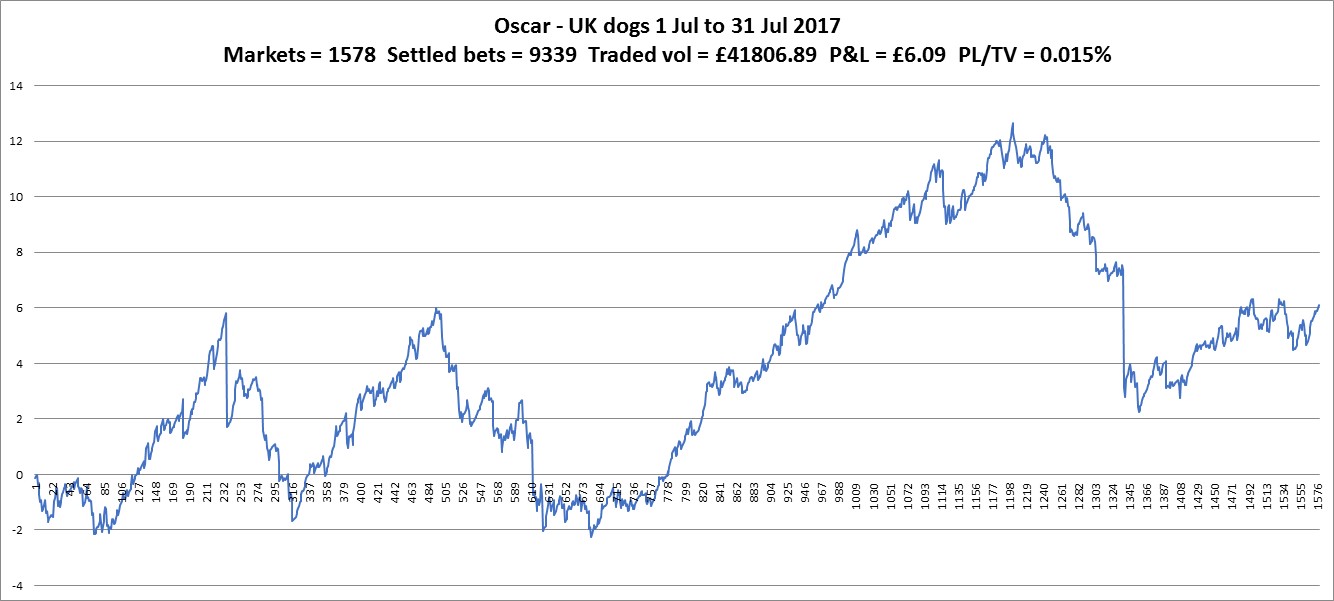
Oscar now and the UK dogs. Hmm. It is positive, that’s about it.

chart_ukdogs170731

Aus horses. Also positive…

chart_aus_horse170731

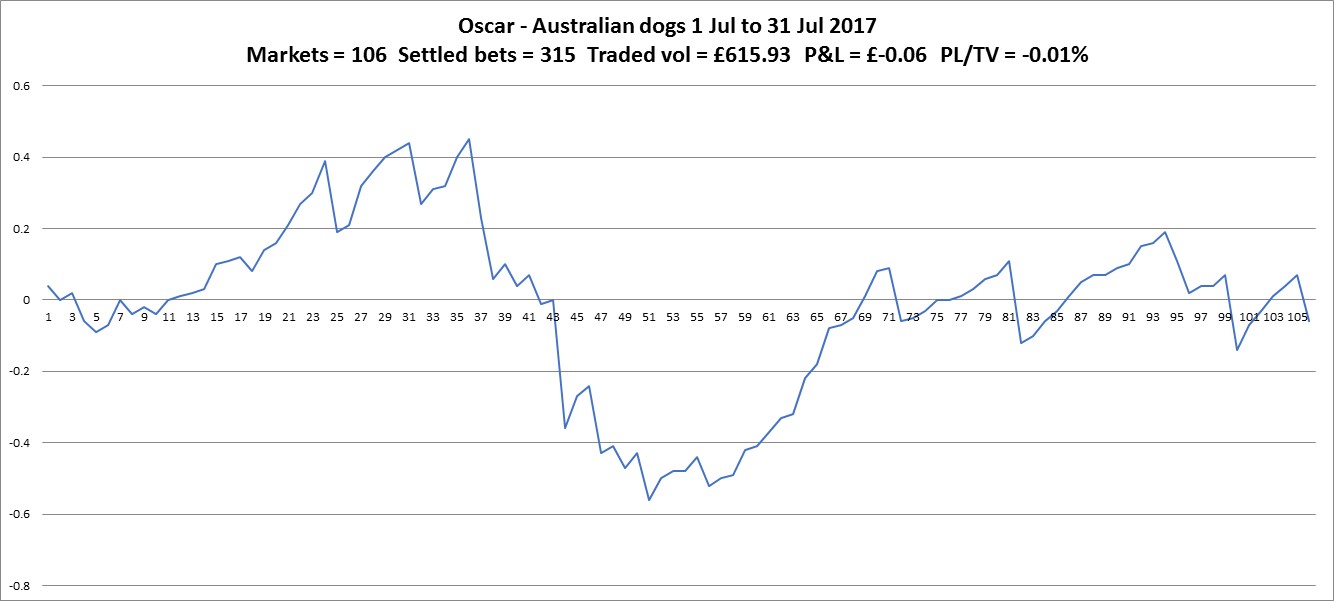
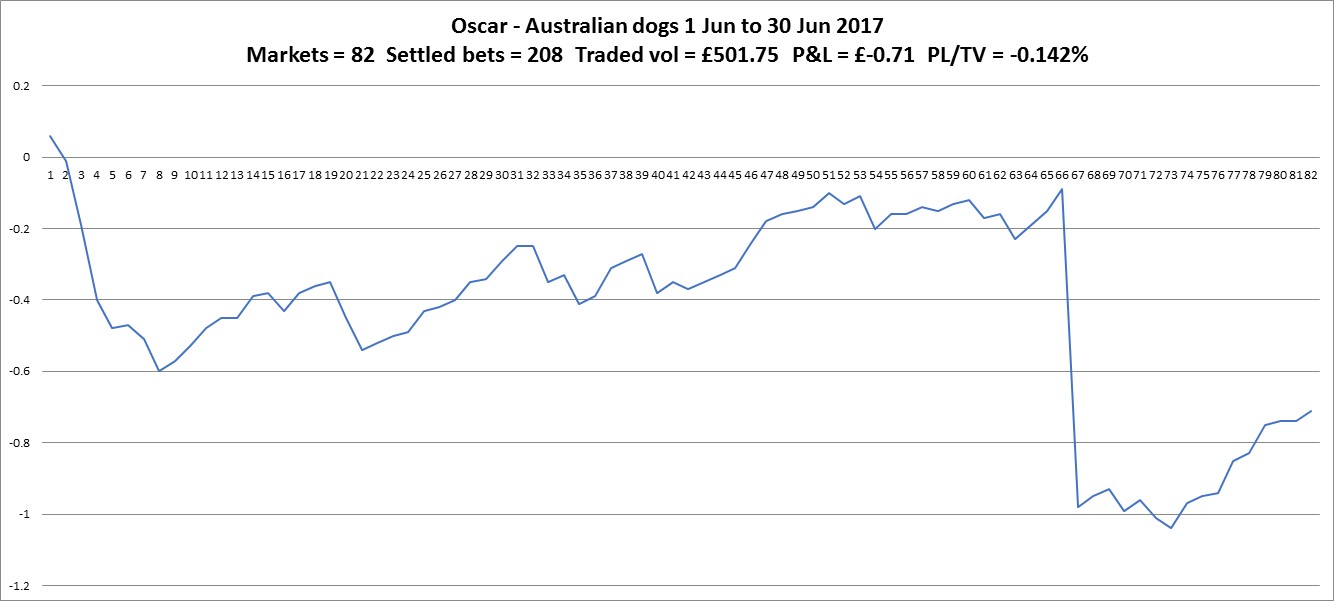
Aus dogs. The story of the 6p I wish I still had. Seriously though, there just isn’t the liquidity so the result could be anywhere to be fair. I stopped this bot at the beginning of August with a profit of 12p since May. I don’t see any reason to risk a big loss on these markets where it is unlikely to ever make it back.

chart_aus_dogs170731

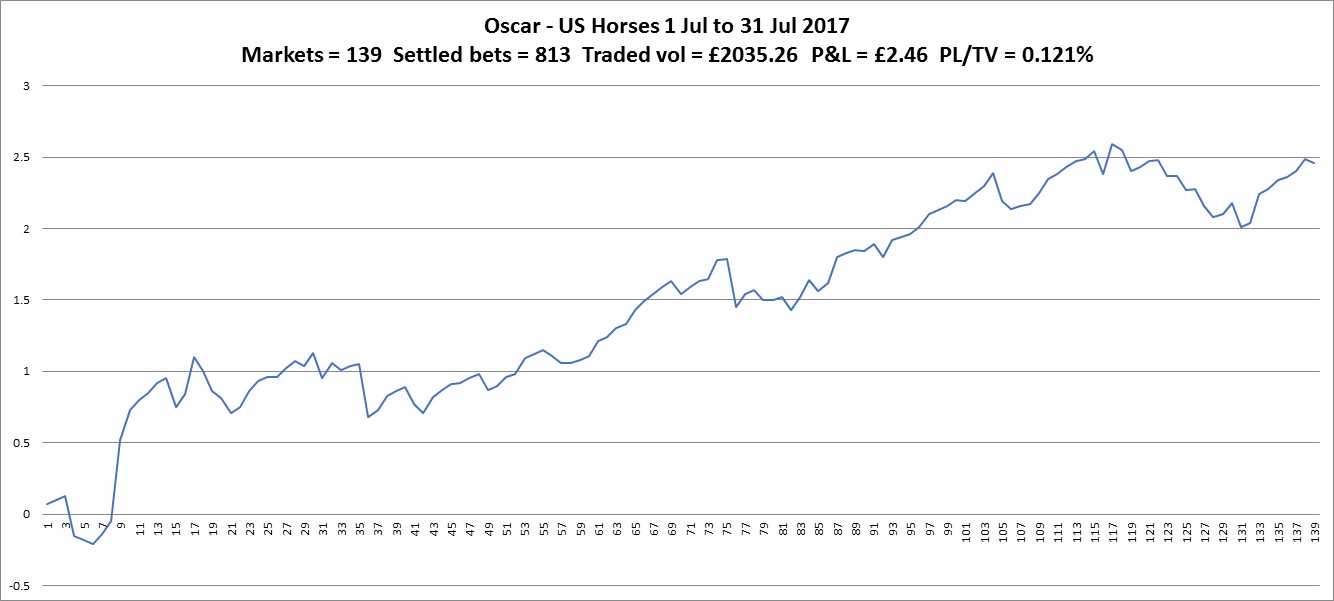
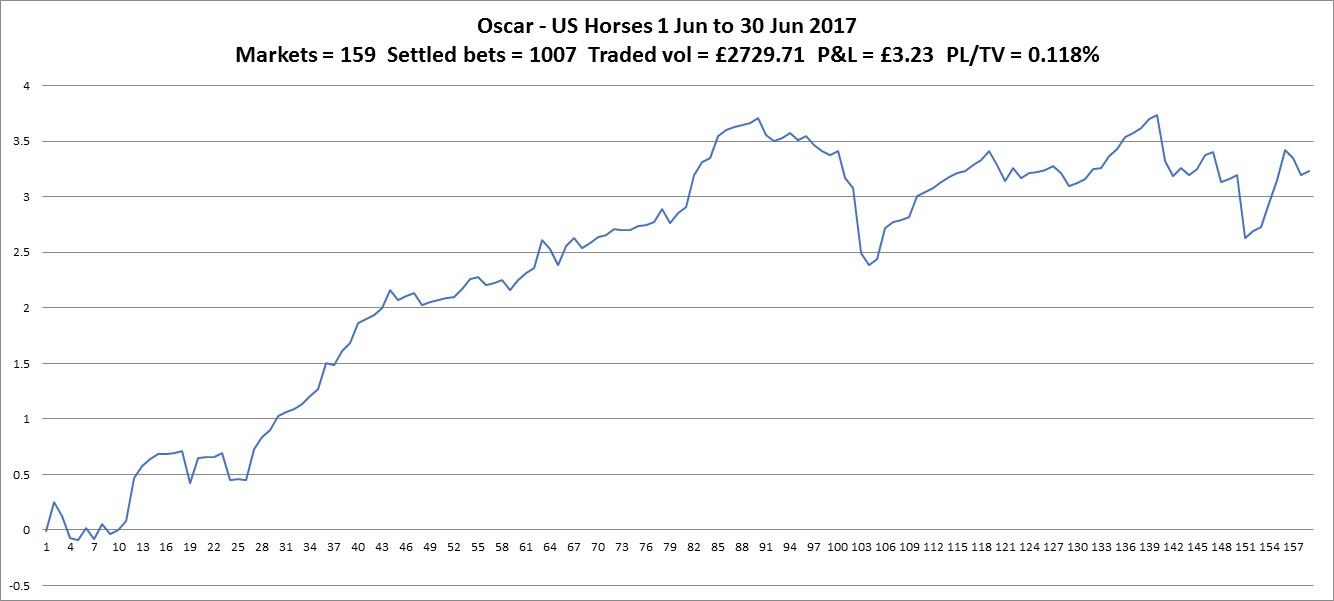
Us horses have produced again with 0.121% for July. June was 0.118%. Not vastly more markets traded than the Aus dogs but there are races that get as much money as the bigger UK dogs races and the higher liquidity gives more opportunities to trade. I guess these races are the televised ones?

chart_ushorse170731

I’ve been invited along to the Ebor festival at York races on the Saturday. I’m taking a bit more out of the bank for spend. It’ll be the first big race I’ve been to having only been to the races three times before – regular events at Doncaster, Ripon and Pontefract – so am looking forward to it.

June ’17

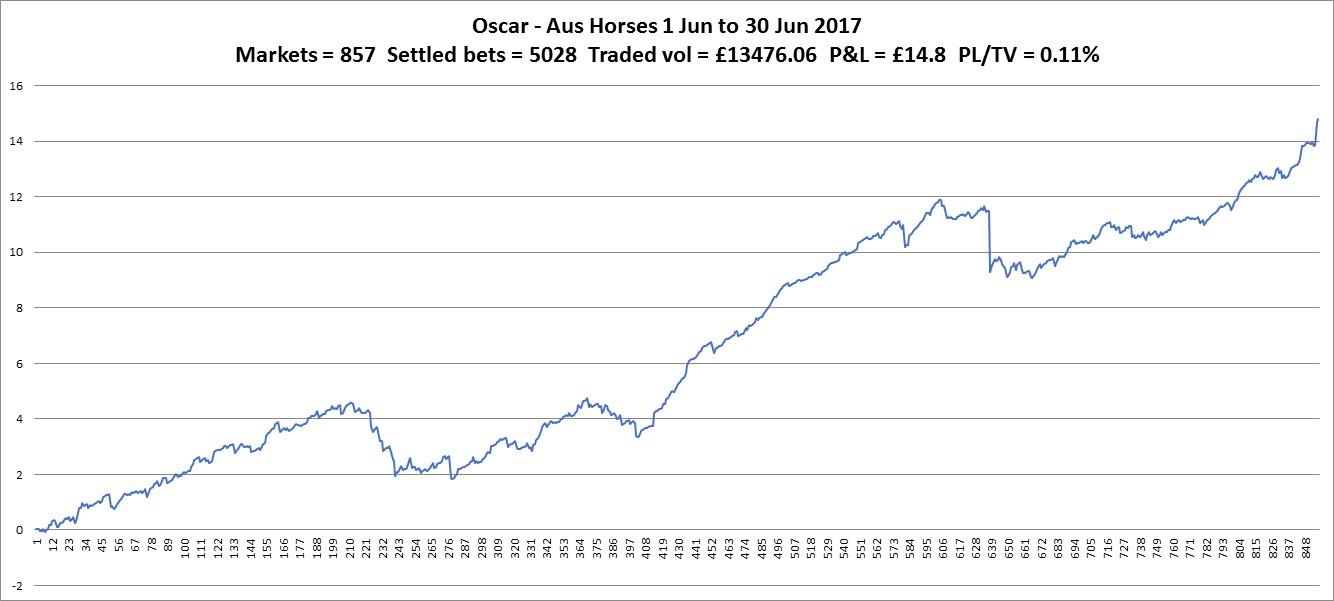
The big event of June was the release of a beta streaming version of Gruss. As it is in development, the Gruss guys requested feedback and there were a number of bugs highlighted by users. We are now on the sixth release, which is good to know the program is being worked on and improved. The bug that I found related to moving on from suspended markets but after I fed back via the forum, a fix was quickly released. It took a little time for me to grasp the full effects of streaming. At first I thought the refresh was poor as updates were very random. The stream only updates when there is something to update, ie market activity, and doesn’t waste bandwidth by refreshing the same data repeatedly, as before streaming. This gives a refresh chart that can have quite large gaps between updates, especially on markets with some time to go before off. Now, with only a few minutes to off, the refreshes come in more than every 200ms. As there are no requests for price data, there’s no added delay. To note, the charts on the VPS are showing lower times than those at home. The request delay will still be relevant when placing orders in the market but no data is available on what it is.

Another major event, for me, was the changes to the Aus turnover eligibility. I posted about this here. I’m on with the coding around this. I have a section of code that only runs once when a market is selected and then isn’t run every refresh. I’m adding the NSW code there, which was straight forward for checking against the list of courses but tracking the traded back bets over a week is a little more complicated.

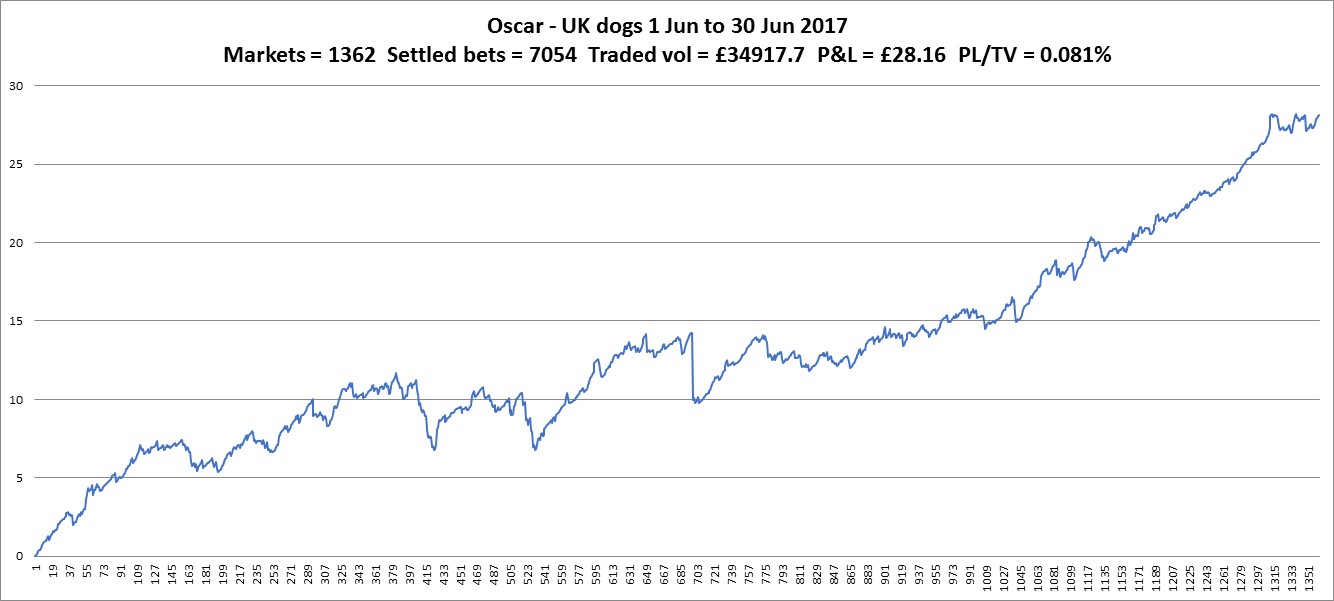
The UK dogs have done good this month. I’m considering adjusting the stake range to allow higher bets. I want to trial it on specific markets first. I’m thinking of those that are televised and tend to have much higher activity.

chart_ukdogs170630

An improved chart from the Aus horses compared to recent months. It’s nice to see a good return as I was beginning to lose patience with it and was considering stopping this bot. It’s been a long time since I ran Oscar on the UK horses as there was no value in it for me and I was thinking the Aus horses were going the same way. They still might, to be fair. But for now, with this, it will continue.

chart_aus_horse170630

US horses – better result than not trading them at all. There are some really well funded races that I’m missing, purely down to start times been well off. I’ll continue moaning about this point until I finally get a solution in place (I’ve had some good suggestions from you but the code don’t write itself, I should get on with it).

chart_ushorse170630

Definitely lower activity on the dish-lickers. An unfortunate loss keeping the return in the negative. Not much harm in continuing for now, I consider this my experimental contribution (why not?)

chart_aus_dogs170630

A comment, an icon, rounding and an offer.

US Horse Racing Off Times have been a problem for bot developers since the year dot. The US off times are just a guide and are not religiously adhered to like the rest of the world. Initially I got around this by polling the Time to Post stat that gives a guide of when the off time is due. This value can be scraped from a number of different sites. Even this was a little hit and miss. What I eventually landed on was waiting till the overround was less than 105% to indicate that the race was about to go off. Works quite well in sparse US markets where all the money comes in at the end before the off.

Thanks for this comment. I’ve looked into scraping times and have found a few sites. Not made any attempts to integrate yet. The idea of watching the overround is very good and something I hadn’t thought of. This goes on the to-do list, thanks.


I’ve been coding an app in Visual Studio to replicate a spreadsheet I’d made when I was doing the matched betting thing. I added an icon and thought I’d add it to this site, so if you haven’t noticed, it should be at the top of the address bar and look like this –

favicon3

I like the simple look, which is fortunate. And it should show up as different to WordPress in any bookmarks, or in the blog roll on green-all-over (It’s been quiet over there recently).


The app I’ve made calculates the lay stake at given odds. A problem I encountered whilst testing my little app was a difference between what I calculated and what I was seeing on the Betfair site. It’s only small but at large stakes it’s noticeable and any discrepancies are worrying, suggesting an error in the formula used. My error came down to rounding. Initially I was just rounding the result only to 2dp. Each step of the formula requires rounding to 2dp to keep it accurate. At no point can you place a lay stake of £50.083333. Attention to detail is key, my mistake.


Talking of attention to detail, I recieved an offer to try out a VPS in Dublin with less than 3ms delay. That’s extremely fast for sports trading and probably as good as it gets without co-location (something I’m sure goes on). I had looked at getting a Dublin based VPS when I was setting up but was not willing to pay the obvious premium rate. The offer I received came via Twitter and the first thing anyone does is look at the website of the people making the offer. I remember this company was looking for people to trial its VPS about a year ago. Their website still has some pages that haven’t been altered from the template settings – the blurb you get when you start a website from a pre-made layout offered by these site builder outfits. There’s a lot of trust when putting your bots onto a VPS and you want to know you’re in safe hands that pay attention to detail. I declined the offer.