Tag Archives: betfair

August 2025

First up – FastTrade.

This was intended to be trading for a few weeks until my new bot – Volt – was up and running, more on that below, but for now it’s still my non-stop bot.

The data is thin on this one due to my minimal code. From the results, I get a good idea of what’s going on. There’s a gap in my model. I’ve always noticed this gap. It is between what I watch and predict some trading code will do, and what it actually does once running.

My data suggests I should be able to trade in around 40% of the markets I monitor. When I open the parameters to do this, I see more losses. When I tighten the parameters, there’s fewer trades and more profits, and I’m only entering around 15% of markets. But I’m struggling to see the difference between some of the made trades and some of missed ones. However, my data isn’t robust enough to be conclusive, so I might be way off with my thoughts.

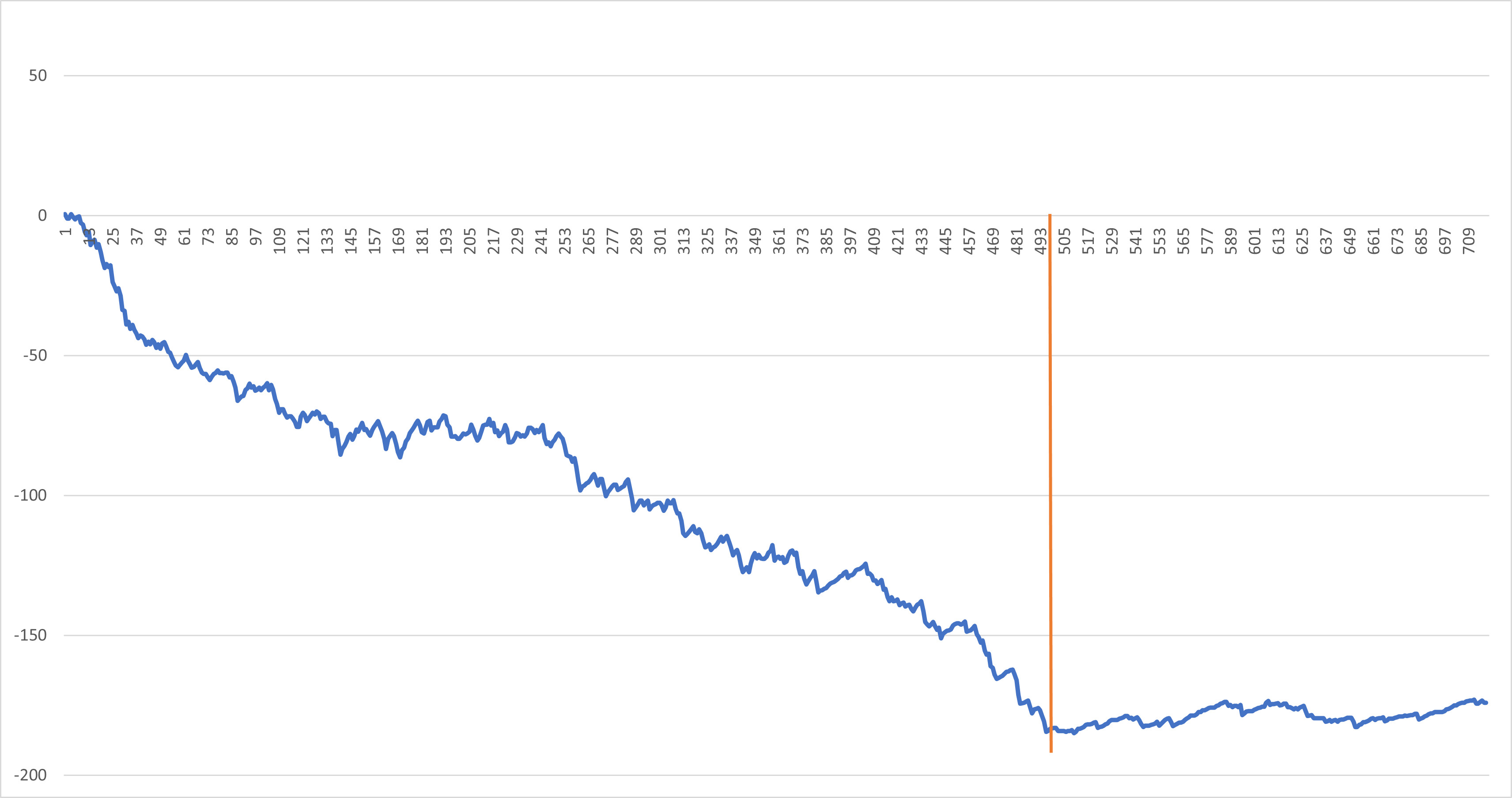
Here’s a chart from the past few weeks, the orange line indicates the point where my last significant change was made. Results after this are more positive and steady.
As for Volt, it’s a work in progress. I run it live for a few markets on my laptop, not the VPS, review the results and run again. This allows me to gather more data and then continue with the building process.

My idea with this bot was to find the trades as I built the code, and I am getting somewhere, but it’s not giving me the activity I want quick enough, and I’m starting to think of other possible angles.

My most successful trading has come from statistical models with a bit of technical analysis thrown in, trading the moves in the markets around various indicators. My ventures into fundamental trading, looking at runner and track stats, has never really produced anything. I have enjoyed writing the data gathering code for this analysis and think there’s probably some value in what I’ve got, but I haven’t found it yet.

Still, happy botting everyone!

Enhance Your System Time Sync

If my computer’s time drifts a little, it’s no major issue. But if it becomes a few seconds out of line it can have an impact on trading, especially greening up. For me the greening period is important as trading can be quite frantic in the last minute or so before the off. And having a balanced book is part of my plan.

You can set Windows to keep time synced but this doesn’t appear to be very good in my experience. I’ve used an app to regularly keep my operating system time accurately synced. As mentioned in this post I’ve previously used Dimension4 by Thinking Man Software. However, after some googles I decided to try something different.

I’ve installed Meinberg NTP (see here) on my VPS. It works as soon as it’s installed but inreasing NTP pools is recommended, so I added a few extra European pools. There’s also a really useful guide here to help get started, but it really is straight forward to set up. It also seems light enough with no impact on processor when running. Both time.is and Gruss refresh chart show near perfect times, and I’ve not seen any drift, so all good.

Building a Better Trading Bot: Lessons from FastTrade to VOLT

The bot that’s running on the VPS, which is testing my ability to stomach losses, I’ve called FastTrade (now at version 1.3). This is the bare-bones design, and “works” perfectly. I was happy with where I’d got it to but didn’t want to be slowed by years old coding decisions. It’s mad how you can have code that works well, but then when you spend a bit of time actually thinking about it, you come up with another solution. Then you think some more, and change it again.

One example of this was my logging code. In OSCAR (a retired bot) I’d written code for each logging event – this wrote a line to my logging sheet individually as they were called, including an xlUp line (obviously this brings into question how serious I am about efficiency). It did work, though writing to the sheet on each log event is not in line with my quest for speed. So, one goal I had was to store log events to an array and paste the array at market change, where trading isn’t happening so speed is less important. I moved all the logging code to it’s own module, added an array, and put the repeated code in it’s own sub. Each logging event, still having its own sub, added a string element such as “Trading Period Started” and called the sub that added all the other detail at that exact moment. I then refined this further by adding a string argument to the sub for the name of the logging event. My logging code has gone from multiple subs to just 2 – the log-event-with-argument sub, and the log-log-to-log-sheet sub. Splendid.

I’ve been building my new bot from the ground up, including the log stuff. I’m calling this one VOLT (VOLume Trader). I’d tested manually and got to a point where live testing was possible. An important element here – always have a boolean argument that allows trading. Set to false and the entire code can run but the bit that writes the trigger/order is bypassed. Once you’re happy to trade, change it to true. Although this isn’t an emergency stop, it does allow for testing and quick interventions if things aren’t quite right but you want monitoring to continue.

Well I’d tested and tested, debugged and tested, debugged etc. Literally as soon as I went live it failed – subscript out of range. I actually like this fault finding part, it’s solving the puzzle that I enjoy. Fortunately for me it was one puzzle after another. Not checking for previous data entries, so writing the same thing over and over, exceeding the array size. Then not incrementing after adding data, so missing loads of log events. Checking for the wrong cased words (Closing vs CLOSING). The list is long but my time is short (a bit dramatic).

I’ve written this post whilst watching VOLT run through Sunday evening US horse markets on another screen and all is now well. Logging is working, as is market navigation, where I appear to have got rid of the double quick-pick-list refresh that caused no problem but I found mildly irritating.. The trigger code is there but not active yet. Next step is to add some temporary what-if logging, see how it fares. Happy trading, botters.

Some changes

First a small clarification. I said in the last post that when the currently active bot is triggered, it takes the Back offer. However, it doesn’t do that. It places a back bet at 1 tick lower than the best Lay price. In a tight market that is most likely going to take the Back offer as there won’t be any gap in the spread, but I thought I should be clear. It also explains why I don’t always get matched and the fill or kill element is in the order.

Admin news – I’ve stumped up for a personal WordPress plan to get rid of the banner and ads that came with viewing my blog which should make your experience more pleasurable, or less painful. It also came with a new domain name which looks neat, and my view count has jumped, bonus. There may be some decorative changes to come too, if I get on to it.

Admin news extra – Twitter/X has descended to such a low that WordPress no longer connects to it. But it does connect to Bluesky, so I’ve joined that small village scale community…

To the code – it’s always worth going back to basics. Thinking about it, there are elements of my code that I’ve reused without thinking, as they just work. To that end, in all my time botting and with all the different bots I’ve tried, I’ve always used the same worksheet change event code trigger in Sheet1, which is basically this –

Public Sub Worksheet_Change(ByVal Target As Range)

If Target.Columns.Count <> 16 Then Exit Sub

Application.EnableEvents = False

With Workbooks("MyBot.xlsm").Sheets(Target.Worksheet.Name)

MyCode 'this is in module1

End With

Application.EnableEvents = True

End Sub

Well it turns out that the With reference part – “.Sheets(Target.Worksheets.Name)” is a general reference and uses a look-up to get to the specific sheet from within the Sheets collection. However, for my bot it’s always going to be the same sheet so the reference can be changed to “.Worksheets(“Sheet1″)”. This is apparently better form as specific references should be used where possible. By not looking-up, there should also be a speed advantage (possibly multiple microseconds if I’m lucky). Remember, small wins are still wins. Anyhoo, it now looks like this –

Public Sub Worksheet_Change(ByVal Target As Range)

If Target.Columns.Count <> 16 Then Exit Sub

Application.EnableEvents = False

With Workbooks("MyBot.xlsm").Worksheets("Sheet1")

MyCode 'this is in module1

End With

Application.EnableEvents = True

End Sub

Finally – a shout out to Toby at Punter2Pro who featured my blog in an article last year. I’ve had a few click-throughs, so thanks.

A little P&L, mostly L

The bot has run flawlessly so far, as in it hasn’t failed to navigate the markets or missed any tick offset or stop loss. I do have a chasing stop loss set, and that’s been activated a few times but worked as it should.

The trade/order I’m placing with this set up when triggered is – Take Back offer, fill or kill 3s, 1 tick offset, 2 tick stop loss, 0.5s chasing stop loss, all set for levelling. I’ve made a few adjustments to the trigger to find the limit of effects of different parameters.

In cleaning the code I have got rid of an annoying problem where I’d get an error every time I linked the sheet to Gruss. I’d select any blank cell on the sheet, press Del, and then F5 the code and away it would go, no further problem. It was the reference to the spreadsheet that was incorrect, I’d not included the file extension .xlsm, which makes me wonder how it ever worked. But it did and now it does better.

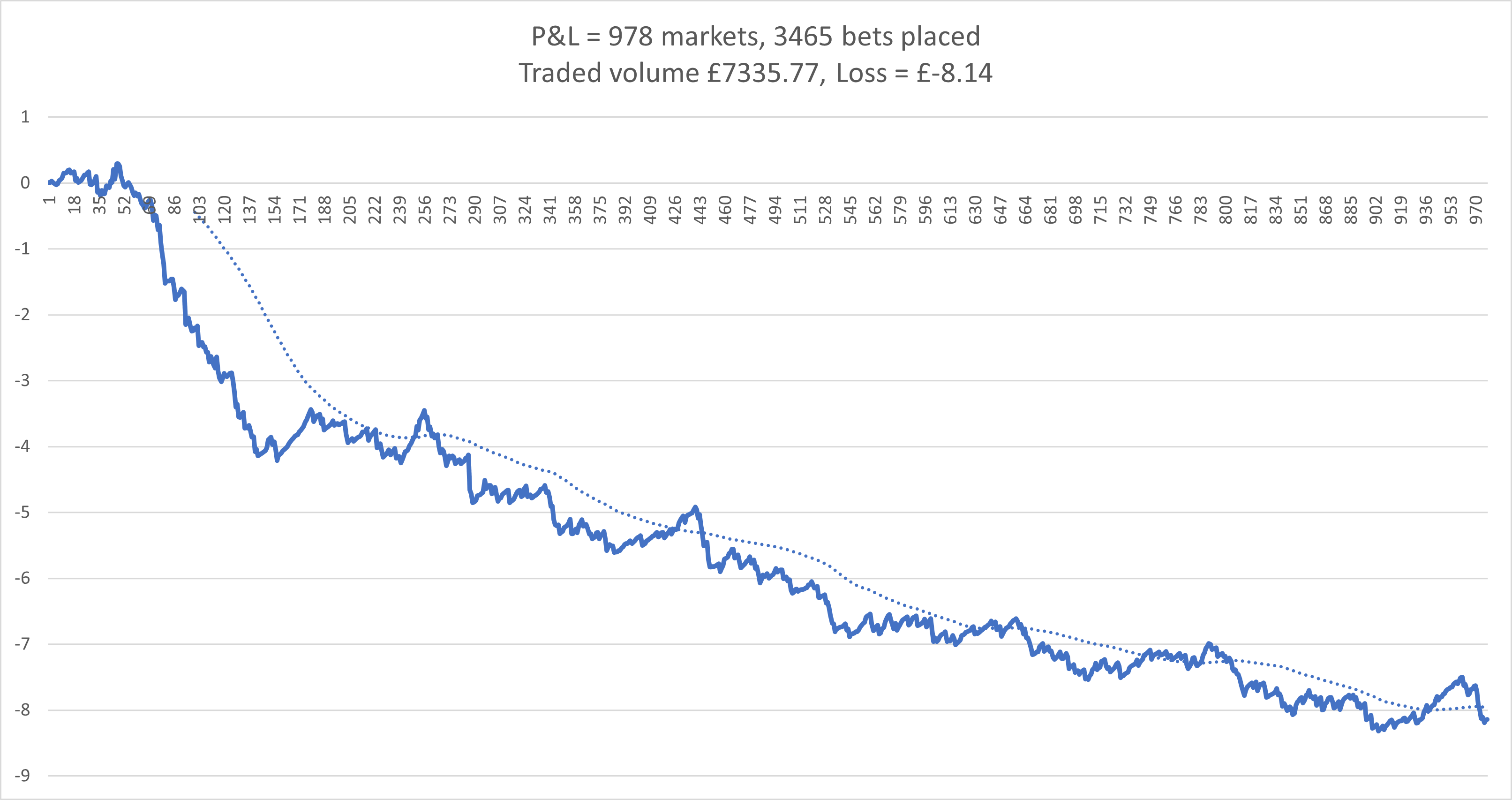
Here’s a chart. This is for most of March and April up to today. Stakes are around £2. The early sharper drop was done with quite open settings. After reigning it in the losses slowed and remained relatively consistent.

My new bot is coming on with improved logging and some better tracking going on. I’m hoping to have it on the VPS in May for testing. The volume tracking is working but I think I can improve it, specifically the amount of data it holds, which I think can be reduced, but doing that efficiently without slowing the whole thing is my goal.

A brief catch-up

After posting in July 2020 I continued the bot for a few more months, then switched it off and closed the VPS due to not spending any time on it. I had plenty of ideas I still wanted to try but other things took priority.

Apparently nothing in 2021, that I can remember.

Throughout 2022 I worked on a strategy based around Australian harness racing. This was mainly due to the availability of race data from harness.org.au, and my ability to collect and work on it. I built my VBA code initially to scrape the previous 18 months of data, and then altered it to run on a daily basis, adding all the new daily data and working backwards to calculate my own ratings, then picking some value bets. It was at this point that the obvious fact I’d missed became apparent – relatively few harness races are available on Betfair. Top tip – always research ideas thoroughly before acting.

Late 2023 and into early 24 I modified a bot to trade on the dogs following prices movements over time. The code was a bit messy and took a while to refine to something that worked. The main problem was once I’d got the code working, I struggled with finding an effective trigger. I thought there was something not quite right and I was planning on moving that to a VPS, but it slipped away for a while.

Then after this last Christmas holiday and into 2025, I picked it up again. Almost immediately spotting an absolute wanger of an error in the code, meaning my price tracking was out of sync with the market. It’s so obvious now as to be almost embarrassing. Simply, each refresh added selected price/volume data to an array and, to keep things trim, deleted entries deemed old. New data was added to the next available slot, but as refreshed are not at set intervals, new data was being dropped in almost randomly. Anyway, I popped that to one side and focused on getting back to basics. With bloated code and masses of notes, I wanted to refine my old favourite bot to be as minimal, or as fast, as possible. The code is now down to the bare minimum, with a clear flow and separated market navigation and trading. So far this approach hasn’t failed. That’s where I got to before starting a VPS and trading from there.

With the bot running ok, although not producing much, it’s the solid base I wanted to get to for my new developments which continue on and off.

VPS Latency

I’ve set up a new VPS with Hostworld and have made a short video showing the difference in latency between my laptop and the VPS. This was a UK greyhound race a minute or two before the start. The number in the green arrow tracing the green line is the latency. the blue line shows the refresh. The VPS is chart is to the rear, with the green marker at the bottom left. It is generally a lower latency, but also more consistent than the laptop.

What’s going on?

[I started this post last week and now I think I’ve solved the problem, but as I’ve written it, you can read it. solution at bottom.]

Over the past two weeks, Oscar, my UK dogs bot, has had six markets failing to trade out or green up. After the first two, I stopped for two days whilst I got round to checking the code but everything was fine, as it should be as I hadn’t changed anything. I restarted and after another few days of trading ok, it happened again, so it’s now stopped. I can’t see anything particular about the markets it’s happening on, and the connection from my VPS appears good. I’m now thinking of adding some extra code to record more details in hope of catching what’s going on.

I’m less narked than you may think as the result so far is I’m up £40 from the errors. But obviously I can’t let it carry on.

In other news, I’ve been reading. A challenging task for someone who flits from one thing to another. Anyway, this had lead to some really good coding sessions (from my point of view) but nothing live yet, only recording and paper trading.

I put quite a bit of time into code that aims to measure the chance of being matched after a trigger is reached and over what period that match would take place. Recording price movement is pretty easy and amount matched over a short period in one direction is also simple. But tracking price, piq and amount matched if the price moves against and then returns, then goes positive, before returning against, is a job for good code. (I’ve not had it marked yet, so no conclusions.)

And I’ve just put on test some code for showing which runner has won on inplay markets. My aim is to know the winner straight away and not have to have a separate process. I have some old code that would take my bets sheet (paper trades) and check it against the RP results page (by runner) after all the races were finished but it requires random fettling to keep up with the website changes. I haven’t used it for some time. It also only happened once a day. My new code works with obvious winners, reaching and staying at 1.01, but then handles close calls individually, with unknowns highlighted for my attention at the moment (this still requires input from me but I’m not checking through every market). I get a rolling update from this.

Inplay is not something I’ve botted with any interest before. But a post on the Gruss forum caught my attention. It regards a simple strategy shown in a YouTube video. It got my interest in the inplay side of things. Rather than throwing bets in and seeing what happens, I thought I’d approach this with a plan and code my way to results rather than bet my way there. If the testing comes to nothing, no waste, I’ve got some cracking reusable code.

[SOLVED, I think]

As mentioned at the top, I think I’ve found the problem.

It’s a time issue. My server clock was 33.7 seconds behind. You can find this out by going to the website – time.is. (My laptop is 0.8s out.) UK dogs are quite sharp with suspending, 30secs+ could easily miss my greening period.

A simple fix? No. Why would it be? Multiple tries at pointing my desktop clock to various internet ntp clocks resulted in a 0.1 second increase in error (huh). I Googled around and found an article on Dimension 4. Downloaded it. This took a few attempts with different servers and then bingo! Back to time.is for an exact result. Bot restarted. Time will tell (time, it’s a time pun, ha ha).


2017 Results

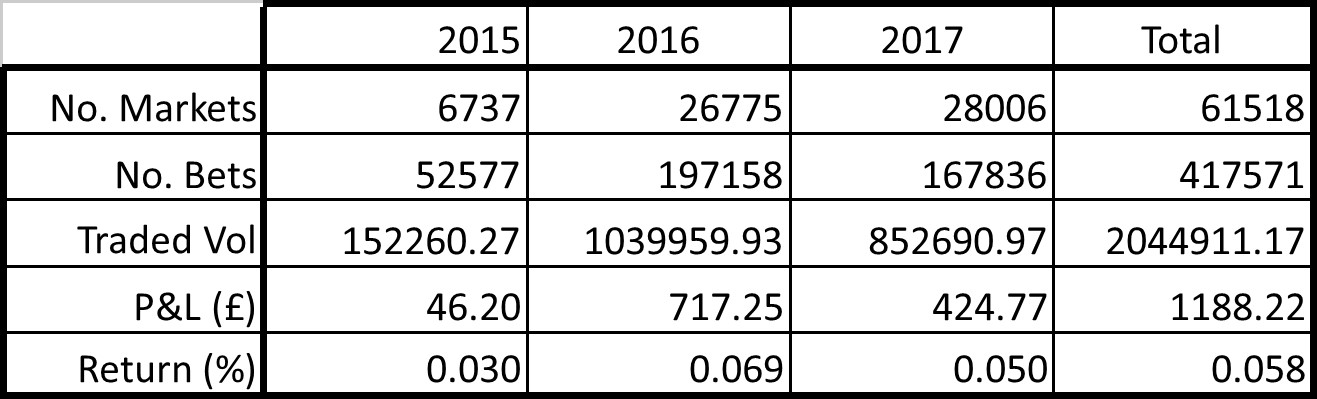
Here are the numbers for 2017 –

Number of markets traded – 28,006

Number of bets settled – 167,836

Traded volume – £852,690.97

Profit and loss – £424.77

Return on traded volume – 0.058%

I haven’t really been bothered with it for a few months and am actually surprised with the final figures (DIY and family have had my time of late). I check in on the VPS now and again and was seeing the past few months not doing very well. The totals for 2017 are propped up by a strong start to the year (see image at bottom).

A little dig in to the numbers we can see that more markets were traded than in 2016 – up 1231 – I did run in other events for  a couple of months or so, which accounts for about the difference. Number of bets settled were down. Traded volume was down overall by around £150,000. Average traded per settled bet dropped from £5.27 to £5.08. Return dropped to 0.050% from 0.069% with a profit for the year of £424.77. (Taking into account the costs of the bot, currently at £21/month, gives a real profit of  £172.77 and a real return on traded volume of 0.020%.)

BIG FIGURE – Traded volume since restart in 2015 is –

£2,044,911.17

That’s a multi-million pound botting operation right there!

I spend more time thinking of coding than actually doing. I sat down to do some tonight but ended up sorting results and doing this post. We’ll have to see what I get up to this year but I would like to advance the current bot.

To my fellow bottors – I hope you all profit from your hard work, happy 2018.


2015_2016_2017_totals