Tag Archives: VPS

Building a Better Trading Bot: Lessons from FastTrade to VOLT

The bot that’s running on the VPS, which is testing my ability to stomach losses, I’ve called FastTrade (now at version 1.3). This is the bare-bones design, and “works” perfectly. I was happy with where I’d got it to but didn’t want to be slowed by years old coding decisions. It’s mad how you can have code that works well, but then when you spend a bit of time actually thinking about it, you come up with another solution. Then you think some more, and change it again.

One example of this was my logging code. In OSCAR (a retired bot) I’d written code for each logging event – this wrote a line to my logging sheet individually as they were called, including an xlUp line (obviously this brings into question how serious I am about efficiency). It did work, though writing to the sheet on each log event is not in line with my quest for speed. So, one goal I had was to store log events to an array and paste the array at market change, where trading isn’t happening so speed is less important. I moved all the logging code to it’s own module, added an array, and put the repeated code in it’s own sub. Each logging event, still having its own sub, added a string element such as “Trading Period Started” and called the sub that added all the other detail at that exact moment. I then refined this further by adding a string argument to the sub for the name of the logging event. My logging code has gone from multiple subs to just 2 – the log-event-with-argument sub, and the log-log-to-log-sheet sub. Splendid.

I’ve been building my new bot from the ground up, including the log stuff. I’m calling this one VOLT (VOLume Trader). I’d tested manually and got to a point where live testing was possible. An important element here – always have a boolean argument that allows trading. Set to false and the entire code can run but the bit that writes the trigger/order is bypassed. Once you’re happy to trade, change it to true. Although this isn’t an emergency stop, it does allow for testing and quick interventions if things aren’t quite right but you want monitoring to continue.

Well I’d tested and tested, debugged and tested, debugged etc. Literally as soon as I went live it failed – subscript out of range. I actually like this fault finding part, it’s solving the puzzle that I enjoy. Fortunately for me it was one puzzle after another. Not checking for previous data entries, so writing the same thing over and over, exceeding the array size. Then not incrementing after adding data, so missing loads of log events. Checking for the wrong cased words (Closing vs CLOSING). The list is long but my time is short (a bit dramatic).

I’ve written this post whilst watching VOLT run through Sunday evening US horse markets on another screen and all is now well. Logging is working, as is market navigation, where I appear to have got rid of the double quick-pick-list refresh that caused no problem but I found mildly irritating.. The trigger code is there but not active yet. Next step is to add some temporary what-if logging, see how it fares. Happy trading, botters.
A little P&L, mostly L

The bot has run flawlessly so far, as in it hasn’t failed to navigate the markets or missed any tick offset or stop loss. I do have a chasing stop loss set, and that’s been activated a few times but worked as it should.

The trade/order I’m placing with this set up when triggered is – Take Back offer, fill or kill 3s, 1 tick offset, 2 tick stop loss, 0.5s chasing stop loss, all set for levelling. I’ve made a few adjustments to the trigger to find the limit of effects of different parameters.

In cleaning the code I have got rid of an annoying problem where I’d get an error every time I linked the sheet to Gruss. I’d select any blank cell on the sheet, press Del, and then F5 the code and away it would go, no further problem. It was the reference to the spreadsheet that was incorrect, I’d not included the file extension .xlsm, which makes me wonder how it ever worked. But it did and now it does better.

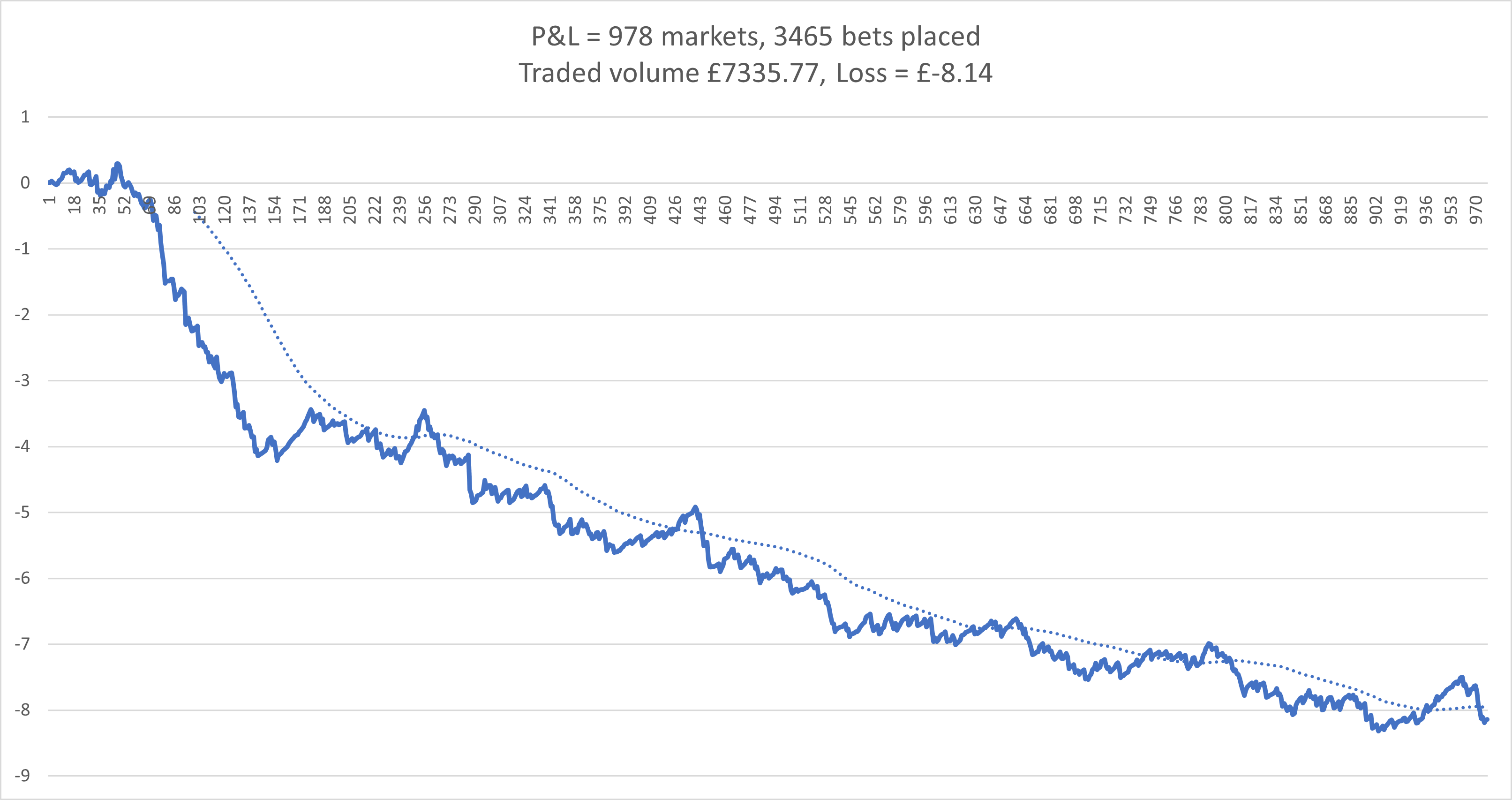
Here’s a chart. This is for most of March and April up to today. Stakes are around £2. The early sharper drop was done with quite open settings. After reigning it in the losses slowed and remained relatively consistent.

My new bot is coming on with improved logging and some better tracking going on. I’m hoping to have it on the VPS in May for testing. The volume tracking is working but I think I can improve it, specifically the amount of data it holds, which I think can be reduced, but doing that efficiently without slowing the whole thing is my goal.

Setting up a VPS in 2025

Setting up my VPS recently was similar to my previous experience, but there’s a few options out there so I thought I’d tell you about what I did and the spec I’ve gone for.

My previous set ups – Tagadab 2016 which I updated to cloud, and followed up with Another VPS update

When I opened my new VPS for 2025 I went for the basic VPS1 Windows package from Hostworld – 1x vCPU 1gd ram. I was immediately underwhelmed. Everything was slow. Response of mouse and clicks was delayed, opening apps took a while. I was surprised as previously I found the performance of this spec level ok. The difference may be due to the Hostworld server set up, the Windows Server version, or something else. Maybe at this point I should have tried another provider.

Anyway, I upgraded to the 4x virtual core 4gb ram VPS3 option, which works a treat and should be good for multiple bots. It feels as fast as my laptop OS. The price of this is similar to Simply Cloud’s 2x vCPU 4gb option which  may have been suitable, but I haven’t tried it so I don’t know.

After sign up, you get a link to connect to the VPS and it creates a desktop shortcut. Once the connection is made the VPS appears like a standard desktop, which you navigate in the usual way. If you have the new Windows App on your phone (it used to be called Remote Desktop) and open the email link sent to you at sign up, you can connect directly to the VPS. The window that opens is a standard desktop. Swiping moves the cursor, tapping to left click.

Back on the laptop and logged into the VPS, downloading Gruss was simple – open browser, go to Gruss Betting Assistant download, and download. Then open and sign in. For info – you can be signed in on the VPS and your home computer at the same time.

A note here regarding the Windows Server option. I initially chose 2019, but Gruss wouldn’t open due to requiring a specific .NET version. I think it was v4.1 or higher. Although all my Google searches said upgrading Server 2019 was possible, I struggled to do so. I reset my VPS with server 2022 OS and it worked fine. Again, this may be to do with Hostworld’s settings, I don’t know. It works now though.

Getting excel was also easy, although slightly unbelievable. I searched for an Office key, and purchased one for 84p – yes £0.84 – for office 2019! Which is perfectly fine. At that price it doesn’t matter that it’s a one use key. Activating required using the phone method, entering the product key and a very long verification code. Nothing difficult though.

Getting my excel file to the VPS was done by copy/paste from my laptop file explorer to VPS file explorer.

If you haven’t set up a VPS and are thinking about it, I’d say give it a go, it really is doable. And once it’s up and running, there’s very little maintenance needed. I had a couple of updates to do in the first 24 hours and nothing else since. Do remember to change automatic updates to ask before doing, you don’t want the VPS restarting mid trade.

VPS Latency

I’ve set up a new VPS with Hostworld and have made a short video showing the difference in latency between my laptop and the VPS. This was a UK greyhound race a minute or two before the start. The number in the green arrow tracing the green line is the latency. the blue line shows the refresh. The VPS is chart is to the rear, with the green marker at the bottom left. It is generally a lower latency, but also more consistent than the laptop.

What’s going on?

[I started this post last week and now I think I’ve solved the problem, but as I’ve written it, you can read it. solution at bottom.]

Over the past two weeks, Oscar, my UK dogs bot, has had six markets failing to trade out or green up. After the first two, I stopped for two days whilst I got round to checking the code but everything was fine, as it should be as I hadn’t changed anything. I restarted and after another few days of trading ok, it happened again, so it’s now stopped. I can’t see anything particular about the markets it’s happening on, and the connection from my VPS appears good. I’m now thinking of adding some extra code to record more details in hope of catching what’s going on.

I’m less narked than you may think as the result so far is I’m up £40 from the errors. But obviously I can’t let it carry on.

In other news, I’ve been reading. A challenging task for someone who flits from one thing to another. Anyway, this had lead to some really good coding sessions (from my point of view) but nothing live yet, only recording and paper trading.

I put quite a bit of time into code that aims to measure the chance of being matched after a trigger is reached and over what period that match would take place. Recording price movement is pretty easy and amount matched over a short period in one direction is also simple. But tracking price, piq and amount matched if the price moves against and then returns, then goes positive, before returning against, is a job for good code. (I’ve not had it marked yet, so no conclusions.)

And I’ve just put on test some code for showing which runner has won on inplay markets. My aim is to know the winner straight away and not have to have a separate process. I have some old code that would take my bets sheet (paper trades) and check it against the RP results page (by runner) after all the races were finished but it requires random fettling to keep up with the website changes. I haven’t used it for some time. It also only happened once a day. My new code works with obvious winners, reaching and staying at 1.01, but then handles close calls individually, with unknowns highlighted for my attention at the moment (this still requires input from me but I’m not checking through every market). I get a rolling update from this.

Inplay is not something I’ve botted with any interest before. But a post on the Gruss forum caught my attention. It regards a simple strategy shown in a YouTube video. It got my interest in the inplay side of things. Rather than throwing bets in and seeing what happens, I thought I’d approach this with a plan and code my way to results rather than bet my way there. If the testing comes to nothing, no waste, I’ve got some cracking reusable code.

[SOLVED, I think]

As mentioned at the top, I think I’ve found the problem.

It’s a time issue. My server clock was 33.7 seconds behind. You can find this out by going to the website – time.is. (My laptop is 0.8s out.) UK dogs are quite sharp with suspending, 30secs+ could easily miss my greening period.

A simple fix? No. Why would it be? Multiple tries at pointing my desktop clock to various internet ntp clocks resulted in a 0.1 second increase in error (huh). I Googled around and found an article on Dimension 4. Downloaded it. This took a few attempts with different servers and then bingo! Back to time.is for an exact result. Bot restarted. Time will tell (time, it’s a time pun, ha ha).


VPS data usage – streaming

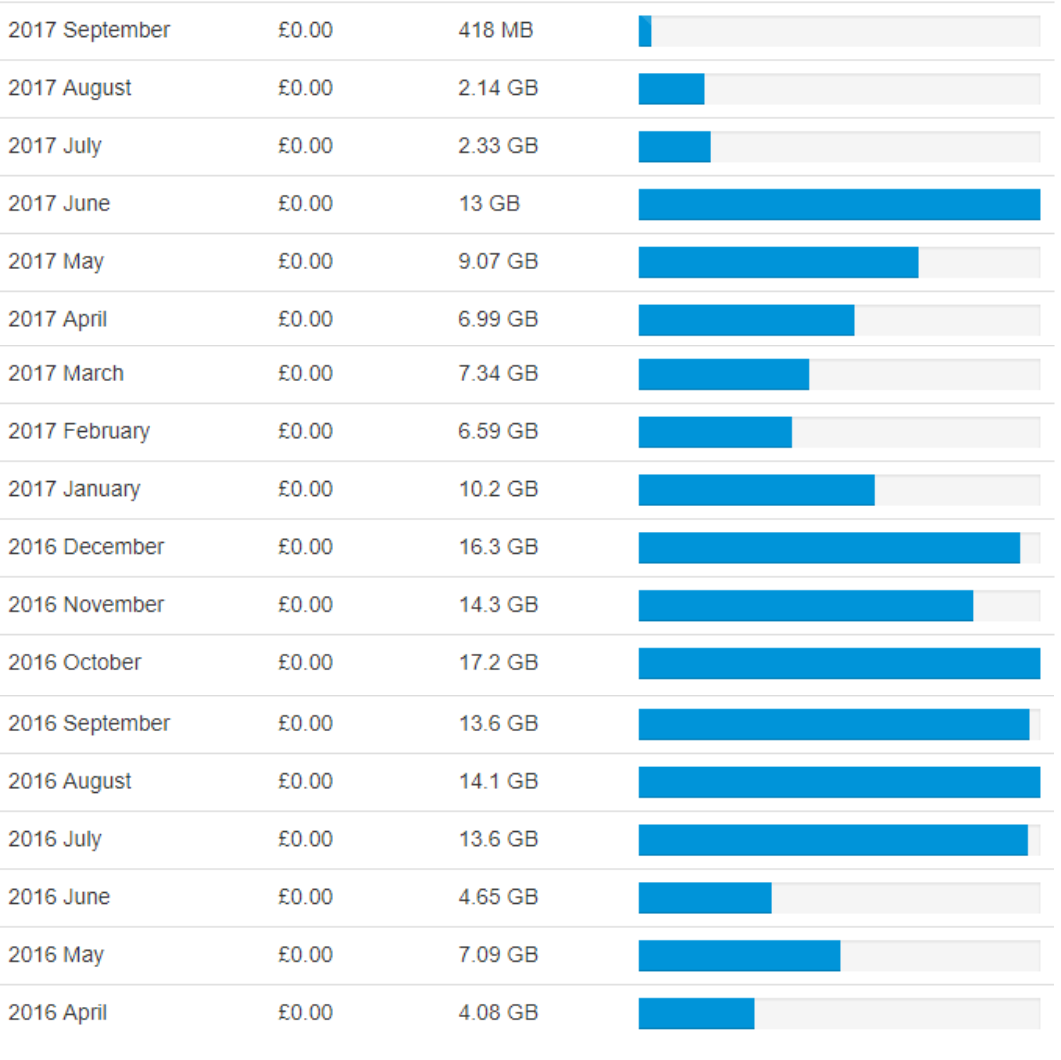
Here is the data usage for my VPS, taken from the Tagadab dashboard.

vpsdata_use

As you can see, since streaming started in July, the amount of data/bandwidth used has reduced considerably. The differing previous monthly figures are down to various reasons – number of bots live/number of events/missed days due to errors/etc. June – 13GB – and July – 2.33GB – both had the four Oscars and one other running most of the time. Even when I wasn’t running full-stream, the data is still delivered via the stream, it’s just how the data is refreshed in Excel that is regulated, so it makes no difference to the bandwidth. (There are options to run off stream but I haven’t used these with the new version.)

The £0.00 value is because there is 50GB included in the package, charges are only incurred for exceeding this amount.

Streaming and NSW

Mike left a comment on the previous post –

Always good to follow your progress. I’ve been trialing the new Gruss at home but have yet to let it loose with my Bots on my VPS. You say; “To note, the charts on the VPS are showing lower times than those at home” I’m reading that to mean “faster” times not “slower” times. What’s the bandwidth usage like with multiple sheets running?

As for the NSW markets, if you lay first it is theoretically possible to close out/green/red up your trade by laying out the other runners across the field, thereby not placing any back bets and avoiding the turnover charge. Albeit more complicated mathematics and process and it may not suit your trading style, but it is an option.

Thanks for the comment.

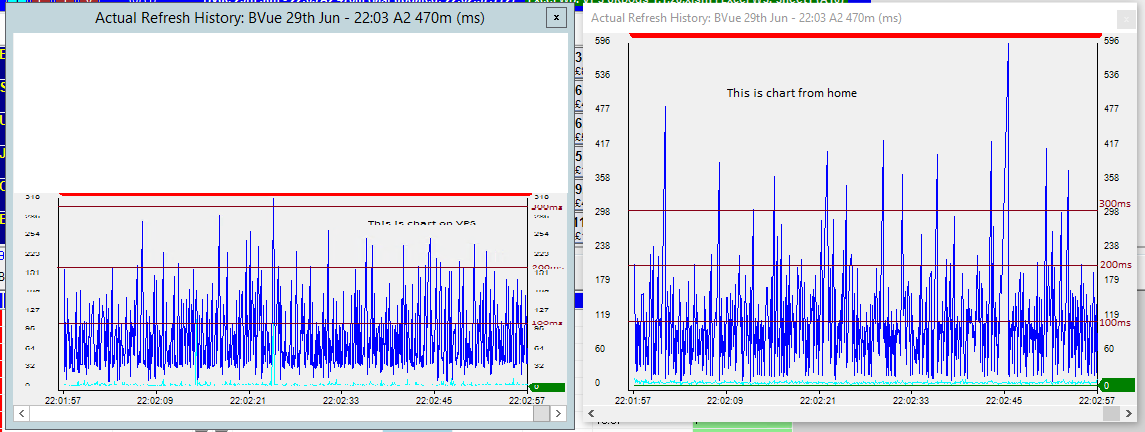
You are right, I meant faster times. Below is an image showing the charts whilst streaming from the VPS and from home, both monitoring same event at same time. Although the scales are different, I’ve added 100, 200 and 300 increments to highlight the difference. The VPS is generally lower times, faster, but more importantly, the consistency is better. For example, the VPS chart has 1 refresh greater than 300ms for this period, whereas at home I see 12 occasions of greater than 300ms.

gruss_stream11

In this next image I’ve tried to match the timings. Interestingly it looks like the home refresh is sometimes faster but this is just a consequence of refreshes coming in close after the refreshes that are notably slower (otherwise, if every refresh was slower, the market would drift away behind real time as the delay is compounded – mind boggling).

gruss_stream12

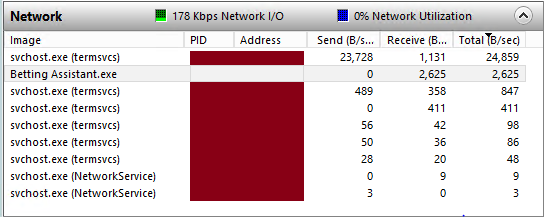
I’m not too sure how best to measure bandwidth in real-time but this is from the resource monitor in Windows Task Manager. This was taken with two sheets open. The first was a UK evening greyhounds with about 40s to off. The other was a US horse race from about 2 mins out (approx £5K matched). 2600 Bit per second is equal to 325 Byte per second (according to Google). Hope this helps, or let me know if there’s a better measure.

vps_bandwidth

Your possible solution to the NSW issue is very much outside the box and an excellent reminder of what we’re doing in the market. If you back one selection, you’re not only backing it, you’re effectively laying every other selection. Using this logic, as you say, it’s possible in theory to trade through the market without having to place a back bet. It does require a market with tight spreads. And also a large enough stake to be able to lay all other selections with as close to calculated values as possible. But it could work. Not likely for me though, off the top of my head, my initial stakes would be too low. I like the thinking though.

A comment, an icon, rounding and an offer.

US Horse Racing Off Times have been a problem for bot developers since the year dot. The US off times are just a guide and are not religiously adhered to like the rest of the world. Initially I got around this by polling the Time to Post stat that gives a guide of when the off time is due. This value can be scraped from a number of different sites. Even this was a little hit and miss. What I eventually landed on was waiting till the overround was less than 105% to indicate that the race was about to go off. Works quite well in sparse US markets where all the money comes in at the end before the off.

Thanks for this comment. I’ve looked into scraping times and have found a few sites. Not made any attempts to integrate yet. The idea of watching the overround is very good and something I hadn’t thought of. This goes on the to-do list, thanks.


I’ve been coding an app in Visual Studio to replicate a spreadsheet I’d made when I was doing the matched betting thing. I added an icon and thought I’d add it to this site, so if you haven’t noticed, it should be at the top of the address bar and look like this –

favicon3

I like the simple look, which is fortunate. And it should show up as different to WordPress in any bookmarks, or in the blog roll on green-all-over (It’s been quiet over there recently).


The app I’ve made calculates the lay stake at given odds. A problem I encountered whilst testing my little app was a difference between what I calculated and what I was seeing on the Betfair site. It’s only small but at large stakes it’s noticeable and any discrepancies are worrying, suggesting an error in the formula used. My error came down to rounding. Initially I was just rounding the result only to 2dp. Each step of the formula requires rounding to 2dp to keep it accurate. At no point can you place a lay stake of £50.083333. Attention to detail is key, my mistake.


Talking of attention to detail, I recieved an offer to try out a VPS in Dublin with less than 3ms delay. That’s extremely fast for sports trading and probably as good as it gets without co-location (something I’m sure goes on). I had looked at getting a Dublin based VPS when I was setting up but was not willing to pay the obvious premium rate. The offer I received came via Twitter and the first thing anyone does is look at the website of the people making the offer. I remember this company was looking for people to trial its VPS about a year ago. Their website still has some pages that haven’t been altered from the template settings – the blurb you get when you start a website from a pre-made layout offered by these site builder outfits. There’s a lot of trust when putting your bots onto a VPS and you want to know you’re in safe hands that pay attention to detail. I declined the offer.

Out of sync

With Oscar running on the VPS, I can view the desktop from my mobile and, with no rush to get out of bed this morning, I had a look to see what was happening. Something was wrong, an error but not costly.

  • System time was 7:34
  • Next race in list was due off at 6:43
  • Countdown timer was at +17 mins (should be -51mins)
  • Transaction log had over 41000 entries and nothing in since 16:30 yesterday
  • Last trades in Betfair history were 3:00 this morning

I don’t know why this happened but am guessing it’s been too long since I last restarted the software. I’ve hit an error before in VBA with having variables declared with too low capacity and not coding to deal with when they’re full. Today’s error was on the Gruss side of the set-up and maybe running for 44 days without stopping is too long and fills a dim. I’d be more sure if the log was at a capacity level but I don’t think there’s any variable limit around 41000.

Action taken – saved transaction log and rebooted Gruss. It’s traded some races over the past hour or so and all seems well again.